Archivo de la categoría: General

GENERATING A REST API (JSON)


I’m not going to go into detail here describing what is REST (Representational State Transfer) an API (Application Programming Interface) or JSON (JavaScript Object Notation). I start from the base that is already known to which we refer.

In this case, using the database published in the previous entry Data for demos, I will present how to expose the information from that database, in a read-only API.

At the same time, I will try to show advantages and disadvantages of different methods to achieve the same objective.

Entity Framework

Although in general, I dislike its use, I will try to include it in each demonstration, to see what advantages it brings, and the disadvantages that arise.

The project within the solution is ApiRestEF

Dapper

As a data access package/library, it allows you to easily obtain information from databases.

The project, within the solution is ApiRestDapper

Coding directly

In this case, I’ll be showing how to do, the same thing, but step by step, without libraries.

The project, within the solution is ApiRestCode

First requirement

A method is needed to obtain the information that is displayed, for a continent indicated as a parameter.

ContinentCountryTotal CasesTotal DeathsTotal Cases per MillionTotal Deaths per MillionPopulationPopulation DensityGDP per Capita
AfricaSeychelles12466461267644689834020826382
AfricaCape Verde31433271565354875559881366223
AfricaTunisia36265813305306851126118186187410849
AfricaSouth Africa17220865741029036968593086904712295
AfricaLibya1883863155274164596871287417882
AfricaBotswana59480896252933812351625415807
AfricaNamibia6137496824154381254091639542
AfricaEswatini18705676161235831160164797739
AfricaMorocco52276591921416324936910558807485
AfricaDjibouti1157015411711156988002412705
AfricaGabon2469615611096702225728816562

Entity Framework

The code used obtains the continent and its constituent countries in a single query but required to go through the countries, to obtain from each one, the demographic data.

As I said, I don’t like EF and maybe that’s why my research into methods to do it, may not have found another way.

Of course, if someone offers another proposal in the comments, I’ll add it here, and I’ll also proceed to evaluate the corresponding metric.

public async Task<ActionResult<string>> GetContinent(int id)
{
   var continent = await _context.Continents.FindAsync(id);
   continent.Countries = await _context.Countries
     .Where(x => x.ContinentId == id)
     .Select(x => new Country
     {
        Country1 = x.Country1,
        Id = x.Id,
        ContinentId = x.ContinentId
     }
     )
     .ToListAsync();
   foreach (var item in continent.Countries)
   {
      item.OwidCountriesData = await _context.OwidCountriesData
         .Where(x => x.CountriesId == item.Id)
         .Select(x => new OwidCountriesDatum
         {
            CountriesId = item.Id,
            TotalCases = x.TotalCases,
            TotalDeaths = x.TotalDeaths,
            TotalCasesPerMillion = x.TotalCasesPerMillion,
            TotalDeathsPerMillion = x.TotalDeathsPerMillion,
            Population = x.Population,
            PopulationDensity = x.PopulationDensity,
            GdpPerCapita = x.GdpPerCapita
         }).ToListAsync();
   }
 
   if (continent == null)
   {
      return NotFound();
   }
   string json = JsonSerializer.Serialize(continent, new JsonSerializerOptions()
   {
      WriteIndented = true,
      ReferenceHandler = ReferenceHandler.Preserve
   });
   return json;
}

Dapper

For the case of implementation with Dapper, we directly use the «DapperRow» types as the query return, thus decreasing the mapping between columns and properties. If defined classes were used, the response time would surely be longer.

public async Task<ActionResult<string>> GetContinent(int id)
{
   string sql = @"
                  SELECT 
                       [C].[Continent]
                     , [CO].[Country]
                     , [D].[total_cases]
                     , [D].[total_deaths]
                     , [D].[total_cases_per_million]
                     , [D].[total_deaths_per_million]
                     , [D].[population]
                     , [D].[population_density]
                     , [D].[gdp_per_capita]
                   FROM
                      [OwidCountriesData] AS[D]
                      INNER JOIN
                        [Continents] AS[C]
                      ON[D].[ContinentId] = [C].[Id]
                        INNER JOIN
                          [Countries] AS[CO]
                        ON[D].[CountriesId] = [CO].[Id]
                   WHERE([C].[Id] = @continent)
                   ORDER BY
                       [D].[total_cases_per_million] DESC".Replace("@continent", id.ToString()); ;
   var continent = await _dal.GetDataAsync(sql);
   if (continent == null)
   {
      return NotFound();
   }
   string json = JsonSerializer.Serialize(continent, new JsonSerializerOptions()
   {
      WriteIndented = true,
      ReferenceHandler = ReferenceHandler.Preserve
   });
   return json;
}

Only Code

Finally, for direct query by code, we optimize using the FOR JOSN modifier, and then directly obtaining the resulting JSON string.

public async Task<ActionResult<string>> GetContinent(int id)
{
   string sql = @"    SELECT 
                          [C].[Continent]
                        , [CO].[Country]
                        , [D].[total_cases]
                        , [D].[total_deaths]
                        , [D].[total_cases_per_million]
                        , [D].[total_deaths_per_million]
                        , [D].[population]
                        , [D].[population_density]
                        , [D].[gdp_per_capita]
                      FROM 
                         [OwidCountriesData] AS [D]
                         INNER JOIN
                           [Continents] AS [C]
                         ON [D].[ContinentId] = [C].[Id]
                           INNER JOIN
                             [Countries] AS [CO]
                           ON [D].[CountriesId] = [CO].[Id]
                      WHERE([C].[Id] = @continent)
                      ORDER BY 
                          [D].[total_cases_per_million] DESC FOR JSON AUTO, INCLUDE_NULL_VALUES, ROOT('CountriesInfo');";
   SqlCommand com = _dal.CreateCommand(sql);
   com.Parameters.AddWithValue("@continent", id);
   return await _dal.GetJSONDataAsync(com);
 
}

Note

In both the Dapper and code projects, a minimal data access layer was built to emulate functionality similar to that provided by EF-generated code.

Performance

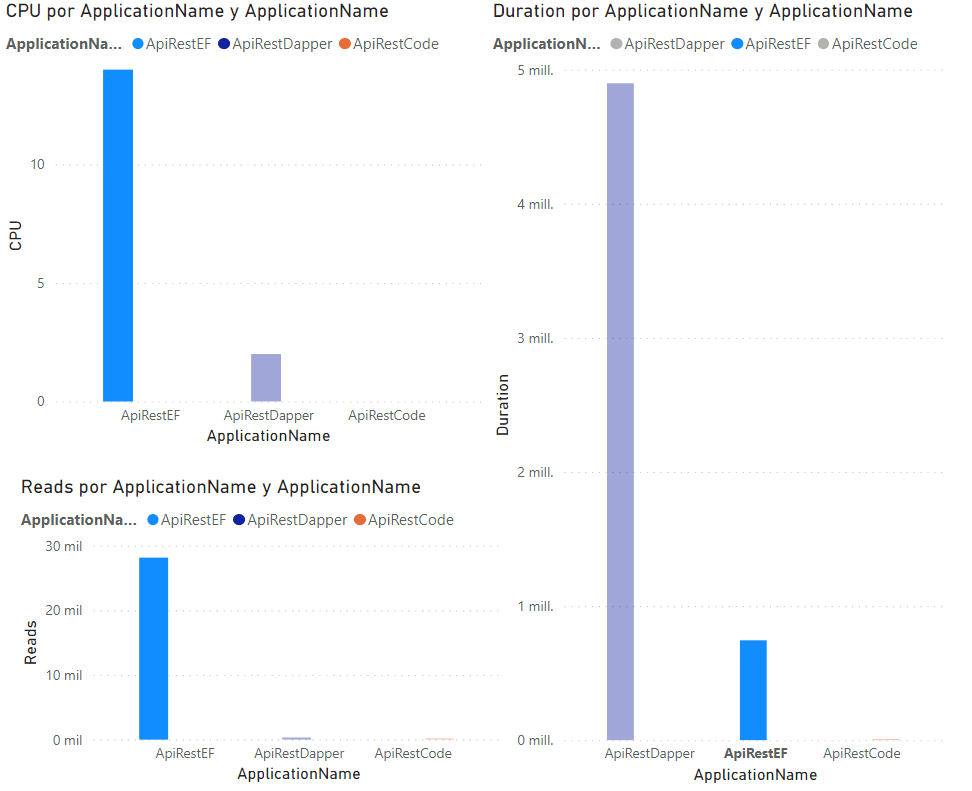
The graph below shows the comparison in CPU utilization, lifetime, and disk reads, in each of the cases.
A picture is worth a thousand words. 🙂

In the graph, values are evaluated only from the point of view of the database, not the .Net code, nor its runtime. I will add this in the next installment.
Demos Data


Lately, I have detected in social networks, various queries about the generation of datasets to expose through, for example, REST APIs.

Having answered some of them directly, I thought it better to leave this published, to facilitate the task of possible future doubts.

For this and other possible examples to come, I decided to generate a sample database, which can be built from freely used published data, by Our World in Data,regarding COVID-19.

This sample database, using real data but not containing personal information of any kind, will allow me to set out some issues related to real-world work. For example, that the volume of data to be used may be large, or that the structure of the data is not always in accordance with what we would like to have.

For the generation of such a database, I decided to create a Jupyter Notebook,which is available  here. On the same share, I also left a  backpac file that allows you to import the sample base directly into a SQL Server.

However, I also left the Notebook, because that way you can run it to generate the database with updated data, as many times as you want.

Here I will leave as a reference, those other publications that make use of this database.

Generating a REST API (JSON)

2021-06-24

Generating a REST API (JSON) [2]

2021-06-25

Generando una API REST (JSON)


No voy a entrar aquí en detalles de descripción de lo que es REST (Representational State Transfer) una API (Application Programming Interface) o JSON (JavaScript Object Notation). Parto de la base que ya se conoce a que nos referimos.

En este caso, utilizando la base de datos publicada en la entrada anterior Datos para demos, presentaré como exponer la información de esa base, en una API de sólo lectura.

Al mismo tiempo, intentaré mostrar ventajas y desventajas de distintos métodos para lograr el mismo objetivo.

Entity Framework

Aunque en líneas generales, me disgusta bastante su utilización, intentaré incluirlo en cada demostración, por ver que ventajas aporta, y los inconvenientes que surjan.

El proyecto dentro de la solución es ApiRestEF

Dapper

Como paquete/biblioteca de acceso a datos, permite fácilmente obtener información de bases de datos.

El proyecto, dentro de la solución es ApiRestDapper

Código directo

En este caso, estaré mostrando como hacer, lo mismo, pero paso a paso, sin bibliotecas.

El proyecto, dentro de la solución es ApiRestCode

Primer requisito.

Se necesita un mecanismo por el cual obtener la información que se muestra, para un continente indicado como parámetro.

ContinentCountryTotal CasesTotal DeathsTotal Cases per MillionTotal Deaths per MillionPopulationPopulation DensityGDP per Capita
AfricaSeychelles12466461267644689834020826382
AfricaCape Verde31433271565354875559881366223
AfricaTunisia36265813305306851126118186187410849
AfricaSouth Africa17220865741029036968593086904712295
AfricaLibya1883863155274164596871287417882
AfricaBotswana59480896252933812351625415807
AfricaNamibia6137496824154381254091639542
AfricaEswatini18705676161235831160164797739
AfricaMorocco52276591921416324936910558807485
AfricaDjibouti1157015411711156988002412705
AfricaGabon2469615611096702225728816562

Entity Framework

El código utilizado obtiene el continente y sus países constitutivos en una sola consulta pero requirió recorrer los países, para obtener de cada uno, los datos demográficos.

Como ya dije, no me gusta EF y quizás por ello, mi investigación de métodos para hacerlo, puede no haber encontrado otra forma.

Por supuesto, si alguien ofrece otra propuesta en los comentarios, la agregaré aquí, y también procederé a evaluar la métrica correspondiente.

public async Task<ActionResult<string>> GetContinent(int id)
{
   var continent = await _context.Continents.FindAsync(id);
   continent.Countries = await _context.Countries
     .Where(x => x.ContinentId == id)
     .Select(x => new Country
     {
        Country1 = x.Country1,
        Id = x.Id,
        ContinentId = x.ContinentId
     }
     )
     .ToListAsync();
   foreach (var item in continent.Countries)
   {
      item.OwidCountriesData = await _context.OwidCountriesData
         .Where(x => x.CountriesId == item.Id)
         .Select(x => new OwidCountriesDatum
         {
            CountriesId = item.Id,
            TotalCases = x.TotalCases,
            TotalDeaths = x.TotalDeaths,
            TotalCasesPerMillion = x.TotalCasesPerMillion,
            TotalDeathsPerMillion = x.TotalDeathsPerMillion,
            Population = x.Population,
            PopulationDensity = x.PopulationDensity,
            GdpPerCapita = x.GdpPerCapita
         }).ToListAsync();
   }
 
   if (continent == null)
   {
      return NotFound();
   }
   string json = JsonSerializer.Serialize(continent, new JsonSerializerOptions()
   {
      WriteIndented = true,
      ReferenceHandler = ReferenceHandler.Preserve
   });
   return json;
}

Dapper

para el caso de la implementación con Dapper, utilizamos directamente los tipos «DapperRow» como retorno de la consulta, disminuyendo así el mapeo entre columnas y propiedades. De usarse clases definidas, seguramente el tiempo de respuesta sería mayor.

public async Task<ActionResult<string>> GetContinent(int id)
{
   string sql = @"
                  SELECT 
                       [C].[Continent]
                     , [CO].[Country]
                     , [D].[total_cases]
                     , [D].[total_deaths]
                     , [D].[total_cases_per_million]
                     , [D].[total_deaths_per_million]
                     , [D].[population]
                     , [D].[population_density]
                     , [D].[gdp_per_capita]
                   FROM
                      [OwidCountriesData] AS[D]
                      INNER JOIN
                        [Continents] AS[C]
                      ON[D].[ContinentId] = [C].[Id]
                        INNER JOIN
                          [Countries] AS[CO]
                        ON[D].[CountriesId] = [CO].[Id]
                   WHERE([C].[Id] = @continent)
                   ORDER BY
                       [D].[total_cases_per_million] DESC".Replace("@continent", id.ToString()); ;
   var continent = await _dal.GetDataAsync(sql);
   if (continent == null)
   {
      return NotFound();
   }
   string json = JsonSerializer.Serialize(continent, new JsonSerializerOptions()
   {
      WriteIndented = true,
      ReferenceHandler = ReferenceHandler.Preserve
   });
   return json;
}

Código

Finalmente, para la consulta directa por código, optimizamos utilizando el modificador FOR JOSN, y obteniendo entonces directamente la cadena JSON resultante.

public async Task<ActionResult<string>> GetContinent(int id)
{
   string sql = @"    SELECT 
                          [C].[Continent]
                        , [CO].[Country]
                        , [D].[total_cases]
                        , [D].[total_deaths]
                        , [D].[total_cases_per_million]
                        , [D].[total_deaths_per_million]
                        , [D].[population]
                        , [D].[population_density]
                        , [D].[gdp_per_capita]
                      FROM 
                         [OwidCountriesData] AS [D]
                         INNER JOIN
                           [Continents] AS [C]
                         ON [D].[ContinentId] = [C].[Id]
                           INNER JOIN
                             [Countries] AS [CO]
                           ON [D].[CountriesId] = [CO].[Id]
                      WHERE([C].[Id] = @continent)
                      ORDER BY 
                          [D].[total_cases_per_million] DESC FOR JSON AUTO, INCLUDE_NULL_VALUES, ROOT('CountriesInfo');";
   SqlCommand com = _dal.CreateCommand(sql);
   com.Parameters.AddWithValue("@continent", id);
   return await _dal.GetJSONDataAsync(com);
 
}

Aclaración

Tanto en el proyecto Dapper como en el de código, se construyó una capa de acceso a datos mínima, para emular similar funcionalidad a la brindada por el código generado por EF.

Rendimiento

El gráfico inferior muestra la comparativa en utilización de CPU, tiempo de duración, y lecturas a disco, en cada uno de los casos.
Una imagen, vale más que mil palabras. 🙂

En el gráfico, solo se evalúan valores desde el punto de vista de la base de datos, no del código .Net, ni su tiempo de ejecución. Agregaré esto en la próxima entrega.

Datos para demos


Últimamente, he detectado en redes sociales, variadas consultas acerca de la generación de conjuntos de datos para exponer a través de, por ejemplo, API REST.

Habiendo respondido algunas de ellas directamente, creí mejor dejar esto publicado, para facilitar la tarea de posibles futuras dudas.

Para éste y otros posibles ejemplos que vendrán, decidí generar una base de datos de ejemplo, que se puede construir a partir de los datos publicados de libre utilización, por Our World in Data, respecto de la COVID-19.

Esta base de datos de ejemplo, utilizando datos reales pero que no contienen información personal de ningún tipo, me permitirá exponer algunas cuestiones relacionadas con el trabajo del mundo real. Por ejemplo, que el volumen de datos a utilizar puede ser grande, o que no siempre la estructura de los datos es acorde a lo que desearíamos disponer.

Para la generación de dicha base de datos, decidí crear un Jupyter Notebook, el cual está disponible aquí. En el mismo recurso compartido, también dejé un archivo backpac que permita importar la base de ejemplo directamente en un SQL Server.

Sin embargo, dejé también el Notebook, porque de esa forma se puede ejecutar el mismo para generar la base con datos actualizados, tantas veces como se desee.

Aquí dejaré como referencia, aquellas otras publicaciones que hagan uso de esta base de datos.

PAGING DATA, NOT CLIENT SIDE (2) (Blazor client)


In the previous post,Paging data, NOT client side. | Universidad Net, I described how to use OFFSET-FETCH pair to paginate data in the server side. In this one, I will describe an example of how to use it in a Web Assembly App.

Note: To test this code, you must create a new Blazor app in Visual Studio.

The Model.

The data model will be a class with two properties, one for the list of items and other with the page’s information.

This classes will be added in the Shared project of the Application.

The first class vary depending on the data you want to display, but the second one will be always the same, enhanced by some code.

Since the pager class will be a standardized and enhanced version of the data retrieved by using the stored procedure, and could be used in different projects, let’s define an interface for it.

IPagesInfo interface.

This is the code for the Interface.

public interface IPagesInfo
{
   #region Properties
 
   /// <summary>
   /// Gets or sets the current page.....
   /// </summary>
   System.Int32 CurrentPage { getset; }
 
   /// <summary>
   /// Gets the current first page number..
   /// </summary>
   Int32 FirstPageNumber { get; }
 
   /// <summary>
   /// Gets the HasNextGroup
   /// Gets a value indicating whether this instance has next page..
   /// </summary>
   Boolean HasNextGroup { get; }
 
   /// <summary>
   /// Gets the HasPreviousGroup
   /// Gets a value indicating whether this instance has previous page..
   /// </summary>
   Boolean HasPreviousGroup { get; }
 
   /// <summary>
   /// Gets the last page number..
   /// </summary>
   Int32 LastPageNumber { get; }
 
   /// <summary>
   /// Gets or sets the number of links to show..
   /// </summary>
   Int32 NumberOfLinks { getset; }
 
   /// <summary>
   /// Gets or sets the size of the page.....
   /// </summary>
   System.Int32 PageSize { getset; }
 
   /// <summary>
   /// Gets or sets the Qty of rows skipped from the top of the select.....
   /// </summary>
   System.Int32 Skip { getset; }
 
   /// <summary>
   /// Gets or sets the Qty of rows taken.....
   /// </summary>
   System.Int32 Take { getset; }
 
   /// <summary>
   /// Gets or sets the amount of items to display.
   /// </summary>
   System.Int32 TotalItems { getset; }
 
   /// <summary>
   /// Gets the total pages available to display..
   /// </summary>
   Int32 TotalPages { get; }
   /// <summary>
   /// Gets the page number for the previous group start.
   /// </summary>
   /// <value>
   /// The page number.
   /// </value>
   Int32 PreviousGroupStart { get; }
   /// <summary>
   /// Gets the  page number for the next group start.
   /// </summary>
   /// <value>
   /// The page number.
   /// </value>
   Int32 NextGroupStart { get; }
   #endregion
}

PagerInfo class.

Here, you have the code for the class implementing the IPagesInfo interface.

Notice the class is responsible of the calculations about page numbers displayed, if there are next or previous groups of pages, etc.

public class PagerInfo : IPagesInfo
{
   #region Fields
 
   /// <summary>
   /// Defines the lastPageNumber.
   /// </summary>
   internal Int32 lastPageNumber = 0;
 
   #endregion
 
   #region Properties
   public Int32 TotalPages
   {
      get => (Int32)Math.Ceiling(TotalItems / (Double)PageSize);
   }
   /// <summary>
   /// Gets the page number for the previous group start.
   /// </summary>
   /// <value>
   /// The page number.
   /// </value>
   public Int32 PreviousGroupStart => LastPageNumber - NumberOfLinks;
   /// <summary>
   /// Gets the  page number for the next group start.
   /// </summary>
   /// <value>
   /// The page number.
   /// </value>
   public Int32 NextGroupStart => LastPageNumber + 1;
 
   /// <summary>
   /// Gets or sets the current page.
   /// </summary>
   public System.Int32 CurrentPage { getset; }
 
   /// <summary>
   /// Gets the current first page number..
   /// </summary>
   public Int32 FirstPageNumber
   {
      get => LastPageNumber - (NumberOfLinks - 1);
   }
 
   /// <summary>
   /// Gets a value indicating whether this instance has next page.
   /// </summary>
   public Boolean HasNextGroup
   {
      get => CurrentPage + NumberOfLinks < TotalPages;
   }
 
   /// <summary>
   /// Gets a value indicating whether this instance has previous page.
   /// </summary>
   public Boolean HasPreviousGroup
   {
      get => CurrentPage > NumberOfLinks;
   }
 
   /// <summary>
   /// Gets the last page number..
   /// </summary>
   public Int32 LastPageNumber
   {
      get
      {
         lastPageNumber = (Int32)Math.Ceiling((Double)CurrentPage / NumberOfLinks) * NumberOfLinks;
         if (lastPageNumber > TotalPages)
         {
            lastPageNumber = TotalPages;
         }
         return lastPageNumber;
      }
   }
 
   /// <summary>
   /// Gets or sets the number of links to show..
   /// </summary>
   public Int32 NumberOfLinks { getset; } = 10;
 
   /// <summary>
   /// Gets or sets the size of the page.....
   /// </summary>
   public System.Int32 PageSize { getset; }
 
   /// <summary>
   /// Gets or sets the Qty of rows skipped from the top of the select.....
   /// </summary>
   public System.Int32 Skip { getset; }
 
   /// <summary>
   /// Gets or sets the Qty of rows taken.....
   /// </summary>
   public System.Int32 Take { getset; }
 
   /// <summary>
   /// Gets or sets the amount of items to display.
   /// </summary>
   public System.Int32 TotalItems { getset; }
 
   /// <summary>
   /// Gets the total pages available to display..
   /// </summary>
 
   #endregion
 
}

The Data Class.

This class will contain your data and the IPagesInfo properties. In this sample, it will be called PersonsPager.

Note: You can easily create it by executing the stored procedure, copying the result and in a new code window (for example, an empty one created for PersonsPager), paste it by the Edit – Paste Special-Past JSON as Classes.

Then replace the names autogenerated by your own and change the type for the second one for the PagesInfo class.

The pasted code names the main class as Rootobject, which has been renamed to PersonsPager.

The Pager class will be changed by PagesInfo, and the Pager class defined could be removed.

This is the final code for the PersonsPager class.

public class PersonsPager
{
 
   public List[] List { getset; }
   public PagerInfo Pager { getset; }
}
public class List
{
   public int BusinessEntityID { getset; }
   public string FirstName { getset; }
   public string MiddleName { getset; }
   public string LastName { getset; }
}

The Pager Component.

You must add a Razor Component. In this sample, it is called Pager.razor.

In the UI code, I use an UL tag, adding a button for previous group of pages (when the user moves beyond the first set of page numbers), buttons for the different page numbers, and a button for the next group as well.

For the buttons, the pagination, page-item, and page-link classes are used.

<nav class="text-center">
   <ul class="pagination">
      @{//Previous page group button.
 
         string className = "page-item " + (!PagesInfo.HasPreviousGroup ? " disabled" : ""); //If there is in previous group, the button will be disabled
         <li class="@className">
            <button class="page-link "
                    @onclick="@(()=>
                                   {
                                      if (PagesInfo.HasPreviousGroup)
                                        ChangePage(PagesInfo.PreviousGroupStart);
                                   }
               )">
               ⏪
            </button>
         </li>
      }
      @*Buttons for page numbers*@
      @for (Int32 i = PagesInfo.FirstPageNumber; i <= PagesInfo.LastPageNumber; i++)
      {
         int pageSelector = i;
 
         className = "page-item " + (i == PagesInfo.CurrentPage ? " active" : "");
         <li class="@className">
            <button class="page-link" @onclick="@(()=>ChangePage(pageSelector))">@string.Format("{0:00}"pageSelector)</button>
         </li>
      }
      @{//Next page group button.
         className = "page-item  " + (!PagesInfo.HasNextGroup ? " disabled" : "");
         <li class="@className">
            <button class="page-link " @onclick="@(()=>
                                                      { if (PagesInfo.HasNextGroup)
                                                            ChangePage(PagesInfo.NextGroupStart);
                                                      }
               )">
               ⏩
            </button>
 
         </li>
      }
   </ul>
</nav>

In the code section, parameters are defined for:

  • an instance of a class implementing the IPagerInfo
  • a value to persist the selected page
  • an EventCallback to notify the client page about the changes in the selection by the user.

Finally, the ChangePage function called every time the user clicks ant of the buttons is defined to change the selected page and notify the client page.

@code {
   [Parameter]
   public IPagesInfo PagesInfo { getset; }
   [Parameter]
   public int SelectedPage { get => PagesInfo.CurrentPage; set => PagesInfo.CurrentPage = value; }
   [Parameter]
   public EventCallback OnPageChange { getset; }
   void ChangePage(int newPage)
   {
      PagesInfo.CurrentPage = newPage;
      SelectedPage = newPage;
      OnPageChange.InvokeAsync(SelectedPage);
   }
}

The controller.

To get the information from the database, you will need an API REST controller which returns the JSON string from the stored procedure.

The method must be decorated with the HttpGet attribute to react when the client page code calls it.

[Route("/[controller]")]
[ApiController]
public class PersonDataController : ControllerBase
{
   public PersonDataController(IConfiguration configuration)
   {
      Configuration = configuration;
   }
 
   public IConfiguration Configuration { get; }
 
   [HttpGet]
   public async Task<stringGetPersons(int selectedPageint pageSize = 10)
   {
      using SqlConnection con = new SqlConnection(Configuration.GetConnectionString("aw"));
      try
      {
         SqlCommand com = new SqlCommand("[Person].[Person_GetforPager]"con);
         com.CommandType = System.Data.CommandType.StoredProcedure;
         com.Parameters.AddWithValue("@skip", (selectedPage == 0 ? 0 : selectedPage - 1* pageSize);
         com.Parameters.AddWithValue("@take"pageSize);
         con.Open();
         string values = (await com.ExecuteScalarAsync()).ToString();
         return values;
      }
      catch (System.Exception ex)
      {
 
         throw;
      }
   }
}

The client page.

A new component will be defined to display the data.

It will contain any type of display for your data (in the sample, it is just a UL list), and an instance of the Pager component.

As usual in a Web assembly app, you must check if you have data to display before performing the UI generation.

Moreover, you can decide if you need display the pager component in case of no more than one page is needed to display the information.

@inject HttpClient httpClient
<h3>Persons</h3>
@if (result != null)
{
   <div>@result.StatusCode</div>
   <div>@result.Content.ReadAsStringAsync().Result</div>
   <div>@httpClient.BaseAddress</div>
}
@if (personsPager != null && personsPager.List.Count() > 0)
{
   <ul>
      @foreach (var item in personsPager.List)
      {
         <li>@item.LastName</li>
 
      }
   </ul>
   @if (personsPager.Pager != null && personsPager.Pager.TotalPages > 1)
   {
      <Pager PagesInfo="PagesInfo" OnPageChange="ChangePage" />
      @**@
   }
}
else SelectedPage = 1;

The code of this page will call the controller get method to retrieve the information.

@code {
   PersonsPager personsPager;
   int SelectedPage;
   public IPagesInfo PagesInfo { get => personsPager.Pager; }
   HttpResponseMessage result;
   protected async override Task OnInitializedAsync()
   {
      await GetDataAsync();
   }
   async void ChangePage()
   {
      SelectedPage = personsPager.Pager.CurrentPage;
      //SelectedPage = PagesInfo.CurrentPage;
      await GetDataAsync();
      this.StateHasChanged();
 
   }
   async Task GetDataAsync()
   {
      //result = await httpClient.GetAsync($"PersonData?Selectedpage={SelectedPage}");
      personsPager = await httpClient.GetFromJsonAsync<PersonsPager>($"PersonData?Selectedpage={SelectedPage}");
 
   }
 
}

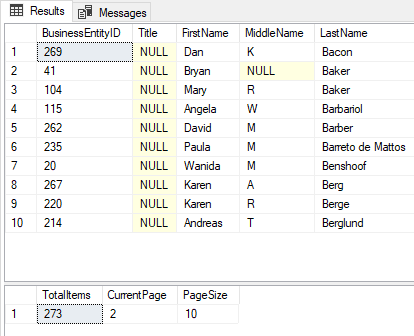
And this is the result:

Persons page with Pager sample

Note: The “aw” connection string points to the AdventureWorks2017 database where the stored procedure from the previous post has been created.

BTW here is the sample

Paging data, NOT client side.


It is frequent to make web sites, mobile, UWP or Windows Applications, which need to present information of several rows which must be presented in pages of data.

That could be accomplished by 3 basic methods:

  1. Send the content to the client and manage the pagination in it, for example, using some of the JScript frameworks available.
  2. Using some sort of LinQ sentence, against EF, which will get the group of data after retrieving the entire set from the database.
  3. Get the exact set of rows needed each time, by using T-SQL from SQL Server

The third method is the most responsive, since it processes the selection in the server side, and reduce the amount of traffic between server, application level and client UI.

This is how I get the information and paging support by using T-SQL.

The OFFSET – FETCH statements.

The basic tool for getting pages of data is the combination of OFFSET <n> FETCH <c>.

The n value is the number of rows excluded from the beginning of the result set, and the c value, the quantity to return.

Any query you create, could be modified by this pair of statements.

Note: This example, uses the AdventureWorks2017 sample database, which you can get here: https://docs.microsoft.com/en-us/sql/samples/adventureworks-install-configure

For example, let us get the employees form the database:

           SELECT
                  [BusinessEntityID],
                  [Title],
                  [FirstName],
                  [MiddleName],
                  [LastName]
              FROM
                   [Person].[Person]
              WHERE [PersonType] = N'EM'
              ORDER BY
                       [LastName],
                       [FirstName]
              OFFSET 10 ROWS FETCH NEXT 20 ROWS ONLY 

It is just a standard select, but with the addition of the OFFSET and FETCH NEXT statements.

Of course, the numeric values could be replaced by parameters, like in:

           SELECT
                  [BusinessEntityID],
                  [Title],
                  [FirstName],
                  [MiddleName],
                  [LastName]
              FROM
                   [Person].[Person]
              WHERE [PersonType] = N'EM'
              ORDER BY
                       [LastName],
                       [FirstName]
              OFFSET @Skip ROWS FETCH NEXT @Take ROWS ONLY 

In case you want to get the first set of rows, the offset value could be 0, and it will work perfectly for your need.

Getting information about the entire set of data.

If you want to display to the user, precise information about the total rows in the set of data etc. you just need to perform another query after this one, by using the same filter in WHERE statement, to count the rows.

At the same time, you can get the current page based in the offset and fetch values, like in this query:

SELECT
   COUNT(*) AS [TotalItems],
   @Skip / @Take + 1 AS [CurrentPage],
   @Take AS [PageSize]
     FROM
      [Person].[Person]
     WHERE [PersonType] = N'EM'

Combining both sentences in the same query, you get two result sets to obtain, for example, using a data wrapper like Dapper:

SELECT
       [BusinessEntityID],
       [Title],
       [FirstName],
       [MiddleName],
       [LastName]
   FROM
        [Person].[Person]
   WHERE [PersonType] = N'EM'
   ORDER BY
            [LastName],
            [FirstName]
   OFFSET @Skip ROWS FETCH NEXT @Take ROWS ONLY;

SELECT
       COUNT(*) AS [TotalItems],
       @Skip / @Take + 1 AS [CurrentPage],
       @Take AS [PageSize]
   FROM
        [Person].[Person]
   WHERE [PersonType] = N'EM';

A JSON for an API.

This sentence could be modified to retrieve a JSON structure containing the entire set, to transfer it by an API to any client, following these rules:

  • The entire set of information must be returned as a well-formed JSON.
  • Each part of the information must be property identified.
  • All the information must be returned as a single string value, which enables to get the information as a scalar value.
  • The first part must be identified as a list/array of data. The second one, just as a unique entry.

For the list of rows, adding FOR JSON PATH, will transform the result in a single JSON content.

For the information about the paging process, it will be modified to avoid create an array of JSON elements, by issuing FOR JSON PATH,WITHOUT_ARRAY_WRAPPER modifier.

Finally, concatenating both sets as different attributes of a single JSON structure, will do the trick.

To have it easy to use, we will make a stored procedure with the entire query, with the corresponding parameters, as follows:

CREATE PROCEDURE [Person].[Person_GetforPager]
 ( @skip INT = 0,
   @take INT = 20
 )
AS
      BEGIN
        SELECT
               '{"List":' +
            (
               SELECT
                      [BusinessEntityID],
                      [Title],
                      [FirstName],
                      [MiddleName],
                      [LastName]
                  FROM
                       [Person].[Person]
                  WHERE [PersonType] = N'EM'
                  ORDER BY
                           [LastName],
                           [FirstName]
                  OFFSET @Skip ROWS FETCH NEXT @Take ROWS ONLY FOR JSON PATH
            )
            + ',"Pager":' +
            (
               SELECT
                      COUNT(*) AS [TotalItems],
                      @Skip / @Take + 1 AS [CurrentPage],
                      @Take AS [PageSize]
                  FROM
                       [Person].[Person]
                  WHERE [PersonType] = N'EM' FOR JSON PATH, WITHOUT_ARRAY_WRAPPER
            )
            + '}';  
    END; 

Executing the procedure, this is the result:

{
   {
      "List": [
         {
            "BusinessEntityID": 38,
            "FirstName": "Kim",
            "MiddleName": "B",
            "LastName": "Abercrombie"
         },
         {
            "BusinessEntityID": 211,
            "FirstName": "Hazem",
            "MiddleName": "E",
            "LastName": "Abolrous"
         },
         {
            "BusinessEntityID": 121,
            "FirstName": "Pilar",
            "MiddleName": "G",
            "LastName": "Ackerman"
         },
      ],
      "Pager": {
         "TotalItems": 273,
         "CurrentPage": 1,
         "PageSize": 10
      }
   }

In the next post, we will see how to use it form a Web Assembly application.

Cerdos y Relatividad


El título es un homenaje a mi padre, digno ejemplo de que cierto presidente latino americano está equivocado respecto a los méritos.

Mi padre decía «no mezclar chanchos (cerdos), con velocidad de la luz al cuadrado», ante una pretensión de confundir cosas.

Y viene a colación porque, sin ser un científico de los datos, mayormente mi trabajo tiene que ver con ellos. No soy un especialista en el análisis, pero estoy día a día trabajando con ellos.

Pero me asombra un poco que tanto gobiernos como medios de comunicación y organizaciones variadas, lanzan datos respecto del lamentable COVID-19, sin darle el marco de referencia necesario.

Veamos algunos casos, con datos públicos obtenidos de https://ourworldindata.org/.

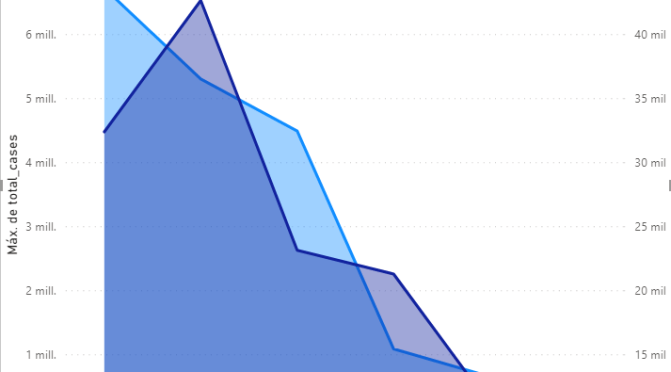
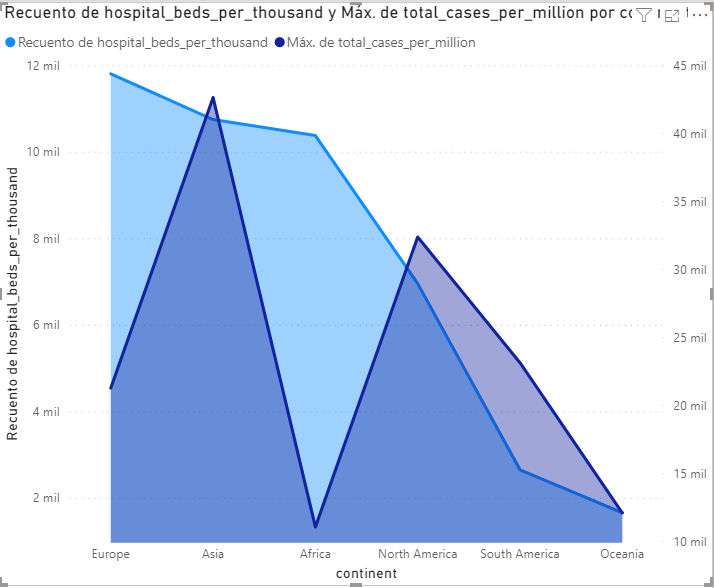
En el siguiente gráfico, vemos la curva de los casos por continente.

Gráfico que representa la pendiente de casos de COVID-19 poor continente, con el valor más altopara Norte América y el más bajo para Oceanía

Que el valor máximo se acerque a los 7 millones, es realmente de susto.

El problema es que desde un punto de vista de análisis de situación, el valor no dice mucho respecto de la gravedad de la enfermedad. Porque, no tiene marco de referencia.

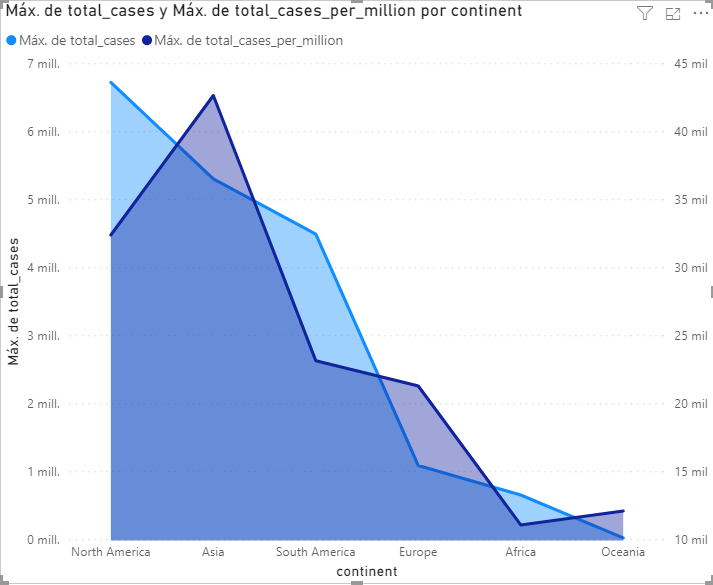
Superpongamos el valor de Casos por millón de habitantes.

A tener en cuenta que la escala de la segunda curva, más oscura, es la de la derecha.

Este segundo valor es más representativo de la realidad, porque establece la proporcionalidad de afectación de la enfermedad.

Pero es que es mucho más dramático hablar de 7000000 que de 32000.

No se está diciendo que el problema. De hecho, todo lo contrario. Lo que se demuestra es que, a veces, los datos no son lo que parecen, depende de como se presenten.

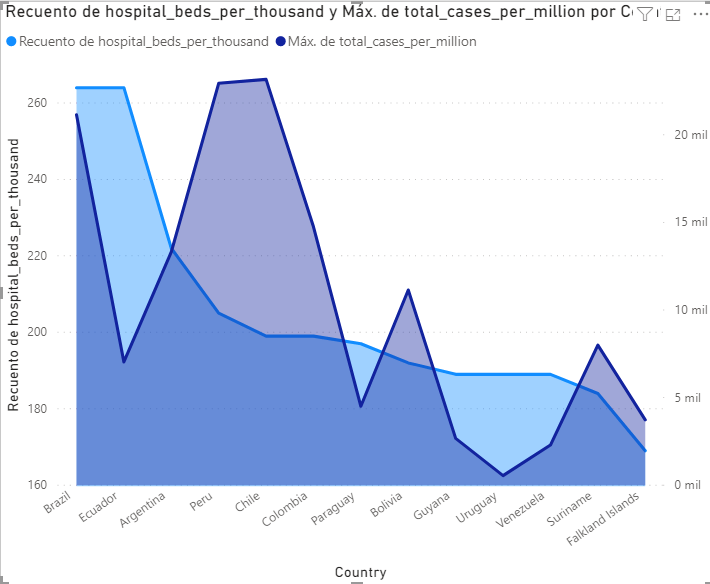
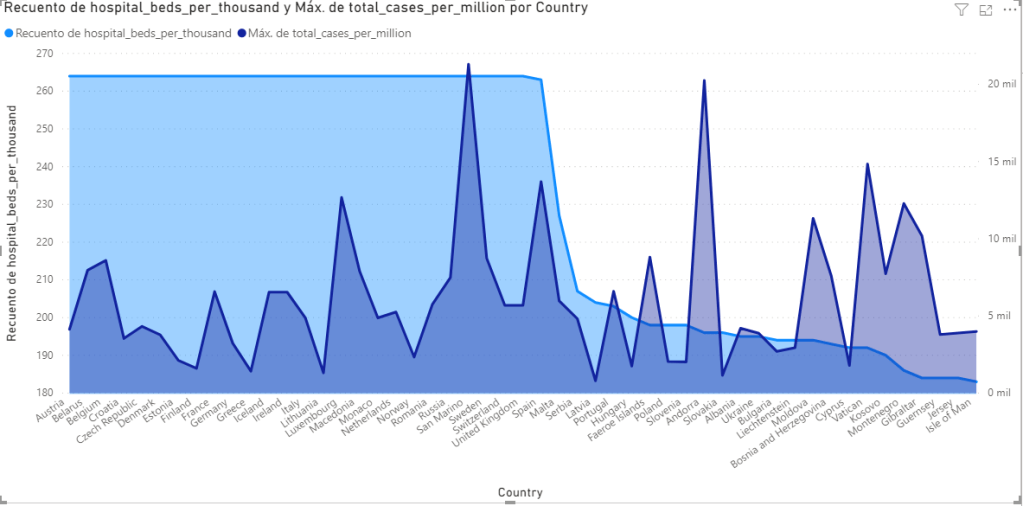
Habiendo establecido esto, la comparativa de camas por mil habitantes, versus el total de casos por millón, nos permite considerar la capacidad de respuesta de cada región.

O visto por país en Sud América

O en Europa

Y así podríamos seguir.

Pero creo que está claro.

Como escuché alguna vez…

La estadística es lo que dice que todos comemos pollo y medio por mes.
Si este mes no comí ninguno, hubo un vivo que comió tres.

Hasta la próxima y a cuidarse.

Making Resources available for other .net dlls


The Problem

I was thinking in have a single common resources Dll for all my libraries to avoid confusion and centralize the localization of them.
But the VS Code Generator for the resource’s files insist in make the properties internal.
I need a way to make them public.

My Solution.

I used T4 template to build a class which exposes the same elements in the resource file as public. Doing so, I can expand the content any time, without the need to write more and more public members.

The basis.

The T4 template helps you creating a file (which could be a class), with the same name of the T4 file and the extension provided in the T4 file definition, using specific directives, like:

<#@ output extension=".cs" #>

(notice the syntax: which start with <#@ and ends with #> )
Inside it, you can write code to generate your class code, using WriteLine or in line tokens for that. (see the official documentation at https://docs.microsoft.com/en-us/visualstudio/modeling/code-generation-and-t4-text-templates ).

Some trick.

To build the different properties for your generated class, the T4 template needs to identify the resources created in the .resx file. As I already told you, they are internal and cannot be accessed from outside the dll. The T4 generator is, in fact, outside the project.
However, the text transformation process (the “generator”), is capable to use Reflection to reach public members like any other .Net code. We just a need to query the resource members rom outside… and that could be done by creating a public class to which we can call and retrieve the members.
At the same time, we can use it to have other practical methods for reach our resources.
Using the partial class feature, we can define the code we need in a partial class which could be part of the generated one.
Let consider we will generate a “Resources.cs” class. We need another file, with some kind of extended extension (I use this name to define a file with more than one dot in its name).
In this case, we have to add a class named, as example, Resources.Tools.cs where we build a public function capable to get the members names of the resource file,. Something like this code:

public partial class Resources
{
   #region "Generator helper"
   public static List<PropertyInfoGetResourcesMembers()
   {
      List<PropertyInfotoGen = new List<PropertyInfo>();
      var res = (from TypeInfo item in System.Reflection.Assembly.GetExecutingAssembly().GetTypes() where item.IsNotPublic orderby item.Name select item.AsType()).ToList();
      foreach (var item in res)
      {
         toGen.AddRange(item.GetProperties(BindingFlags.NonPublic | BindingFlags.Static).OrderBy(x => x.Name).Where(x => x.Name != "ResourceManager"));
      }
      return toGen;
   }
   #endregion "Generator helper"
}

The function analyzes the classes Not Public in the project dll and retrieves the list of properties for all of them.
Once we have this dll compiled, we can proceed to create our T4 template, adding a file named Resources.tt (the tt is the extension for T4 templates).
I’ll no go into the details of all the T4 syntax but, believe me, you need this list of references and directives:

<#@ template debug="false" hostspecific="true" language="C#" #>
<#@ assembly name="System.Core" #>
<#@ assembly name="System.Reflection" #>
<#@ assembly name="System.Xml.Linq" #>
<#@ assembly name="System.Xml" #>
<#@ assembly name="EnvDTE" #>
<#@ assembly name="EnvDTE80" #>
<#@ import namespace="System.Linq" #>
<#@ import namespace="System.Text" #>
<#@ import namespace="System.Collections.Generic" #> 
<#@ import namespace="EnvDTE" #>
<#@ import namespace="EnvDTE80" #>
<#@import namespace="Microsoft.VisualStudio.TextTemplating" #>
<#@import namespace="System.IO" #>
<#@import namespace="System.Xml.Linq"#> 
<#@ output extension=".cs" #>

And here you have the entire explained code:

Snippet

<#
    // retrieve the Visual studio Environment
    DTE dte = ((IServiceProvider)(this.Host)).GetCOMService(typeof(DTE)) as DTE;
    //  Get the projects in current solution
    IList<Project> Projects=GetProjects(dte);
    string debugPath="";
    // define thew name of the class to build (and the partial class we have already created with our helper function)
    string className=Path.GetFileName(this.Host.TemplateFile).Replace(".tt","");
    // Get the directory where the template is stored
    DirectoryInfo projectDir = new DirectoryInfo( Path.GetDirectoryName(this.Host.TemplateFile));
    // Obtain the project file itself
    FileInfo projectFile=( from el in projectDir.GetFiles("*.csproj"select  el).FirstOrDefault();
    // Cleans the project name to search it into the projects' list of the solution
    string projectName=projectFile.Name.Replace(".csproj","");
    // Get the Project object
    Project resourcesPrj=(from el in Projects where el.Name==projectName select el).FirstOrDefault();
    // Gets the directory where the project is stored
    string filePath=(from Property prop in resourcesPrj.Properties where prop.Name=="LocalPath" select prop.Value.ToString()).FirstOrDefault();
    // Obtains the Default name space of the project
    string namespaceName=(from Property prop in resourcesPrj.Properties where prop.Name=="DefaultNamespace" select prop.Value.ToString()).FirstOrDefault();
    // obtains the file name of the compiled the binaries
    string outputFile=(from Property prop in resourcesPrj.Properties where prop.Name=="OutputFileName" select prop.Value.ToString()).FirstOrDefault();
    // Reads the project fiel as XML
    XElement xel = XElement.Load(resourcesPrj.FullName);
    // Find the TargetFramewroks entry to see it it is netStandard or not (the binary is stored in different path)
    XElement fwk = xel.Descendants("TargetFrameworks").FirstOrDefault();
    // Defines the destination folder for the debug binaries depending on the value of TargetFrameworks
    if (fwk !=null && fwk.Value.Contains("netstandard2"))
    {
        debugPath = @"\bin\Debug\netstandard2.0\";

    }
    else
    {
        debugPath = @"\bin\Debug\";;
    }
    // Configure the full path for the binaries
    filePath+=debugPath+outputFile;
    // Loads the latest version of the binaries as an assembly (to get the up to date list, you will need to compile once BEFORE generate the class with this template)
    System.Reflection.Assembly ass=System.Reflection.Assembly.Load(System.IO.File.ReadAllBytes(filePath));
    try
    {
        // Get the type already created with the same name than this template (the first time, it will contains ONLY the support function)
        Type tr = ass.GetType(namespaceName + "." + className);
        // Calls the support method we created, to get the list of the entire resources
        List<System.Reflection.PropertyInfo> toGen = (List<System.Reflection.PropertyInfo>)tr.GetMethod("GetResourcesMembers").Invoke(nullnull);
        if (toGen.Count > 0)
        {
            // start writin g the result file, stariting by its namespace
            WriteLine("namespace " + namespaceName);
            WriteLine("{");
            // define the class (as partial to be combined with the .Tools.cs file during the build of the dll)
            WriteLine("public static partial class " + className);
            WriteLine("{");
            Type prevType = null// this variable store from which type are we getting resources names. THe first time will be null, and will be defined in the following lines
            foreach (System.Reflection.PropertyInfo item in toGen)
            {
                if (prevType != item.DeclaringType) // DeclaringType contains the type where this PropertyInfo belongs to
                {
                    if (prevType != null)// in case we already have a previous type, we ar in a change of type, so we need to close the current generated class
                    {
                        WriteLine("}");
                    }
                    prevType = item.DeclaringType; //<= HERE we store the type from witch we are getting members
                    WriteLine("public static class " + prevType.Name + "{"); // defines a nested class with the DeclaringType name

                }
                WriteLine(string.Format("public static {0} {1} => {3}.{2}.{1};", item.PropertyType, item.Name, item.DeclaringType.Name, namespaceName)); // writes the public declaration of the property, which internally calls the internal member
            }
            // closes the final curly brackets
            WriteLine("}");
            WriteLine("}");
            WriteLine("}");
        }
    }


    catch (Exception ex)    {
        var ufa = ex.Message;
    }
    finally
    {
        ;


    }
        
        
#>
    <#+
    // NOTICE: The syntax for functions includes a plus sign
    // It is hard to get the projects inside a solution, since there could be folders etc. in the solution.
    // See https://wwwlicious.com/envdte-getting-all-projects-html/ where I get this part of the code.(Thanks Scott)
    public  IList<Project> GetProjects(DTE dte)
    {
        Projects projects = dte.Solution.Projects;
        List<Project> list = new List<Project>();
        var item = projects.GetEnumerator();
        while (item.MoveNext())
        {
            var project = item.Current as Project;
            if (project == null)
            {
                continue;
            }
    
            if (project.Kind == ProjectKinds.vsProjectKindSolutionFolder)
            {
                list.AddRange(GetSolutionFolderProjects(project));
            }
            else
            {
                list.Add(project);
            }
        }

        return list;
    }

    private  IEnumerable<Project> GetSolutionFolderProjects(Project solutionFolder)
    {
        List<Project> list = new List<Project>();
        for (var i = 1; i <= solutionFolder.ProjectItems.Count; i++)
        {
            var subProject = solutionFolder.ProjectItems.Item(i).SubProject;
            if (subProject == null)
            {
                continue;
            }

            // If this is another solution folder, do a recursive call, otherwise add
            if (subProject.Kind == ProjectKinds.vsProjectKindSolutionFolder)
            {
                list.AddRange(GetSolutionFolderProjects(subProject));
            }
            else
            {
                list.Add(subProject);
            }
        }
        return list;
    }
#>

A final note

It is not so easy to get the projects inside the solution, since there could be a mess of folders, and other kind of files defined in a .sln file.
I want to thanks Scott Mackay for publish this useful entry: https://wwwlicious.com/envdte-getting-all-projects-html/